Key Points:
Cohort-aware comment filtering is a runtime visibility system for LearnDash that shows learners only the discussions from their own cohort, without duplicating courses or losing historical data.
– The problem: Running multiple cohorts on the same LearnDash course mixes their discussions together, with no built-in way to separate them
– The solution: Runtime filtering hooks into WordPress’s comment query and uses LearnDash group membership to control visibility
– The implementation: ~40 lines of PHP that evaluate shared group access between comment author and viewer
– The result: Admins see all comments for moderation; learners see only their cohort’s conversations
When you’re running a cohort-based learning program, timing is everything. Learners move through content together, discuss challenges as a group, and build connections around shared milestones. But there’s a problem that comes up again and again when running this type of program in LearnDash: the discussion threads don’t understand cohorts.
Imagine that you’re a learner starting Week 3 of your entrepreneurship program. You open a lesson discussion to ask a question, and you’re greeted by comments from last year’s cohort, questions that reference different timelines, and replies that no longer make sense in your context. The discussion space that should feel alive and relevant instead feels like an archive.
This is exactly what we faced when building the platform for Anzisha, a leadership and entrepreneurship program for young African changemakers. They run multiple cohorts simultaneously, each with different start dates, mentors, and schedules. The default WordPress LMS comment system treated all discussions as one continuous thread, accumulating comments across every cohort.
The common solutions weren’t good enough. Deleting comments between cohorts meant losing valuable historical data. Cloning courses for each intake created operational overhead and made it harder to run overlapping programs. Pushing discussions to external forum tools pulled learners out of the learning flow and added another tool to manage.
We found a better way.
How It Works
Instead of duplicating courses for each cohort, we give each cohort its own discussion space through runtime filtering. The course content stays the same; the comments shown change based on who’s viewing.
The system asks a single question every time comments are loaded:
Should this comment be visible to this user in this context?
The Decision Flow
The filtering logic follows a clear progression:
- Is the user an admin? If yes, show everything. No filtering applies.
- Do any LearnDash groups grant access to this course? If no, behave like default WordPress.
- Which groups give the viewer access to this course?
- Which groups give the comment author access to this course?
- Do they share any groups? If yes, show the comment. If they share none, hide it.
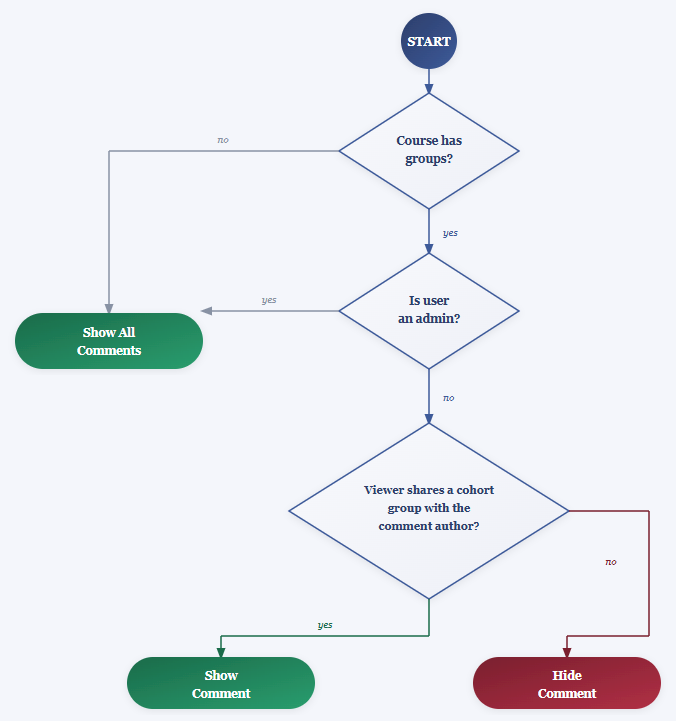
This logic runs every time comments are queried, ensuring that visibility always reflects current group membership and access.
What This Means for Different Users
For learners, the experience is seamless. When they open a discussion on a lesson or topic, they see comments only from other learners in their cohort. Past and future cohort conversations are hidden. There’s no toggle to flip, no setting to configure: discussions simply reflect their shared timeline and context.
For coaches and instructors, comment threads automatically align with the cohort they’re supporting. Questions and replies match the current stage of the program, making it easier to spot confusion early and respond in context.
For administrators, nothing changes. They always see all comments across all cohorts, making moderation, support, and historical review straightforward.
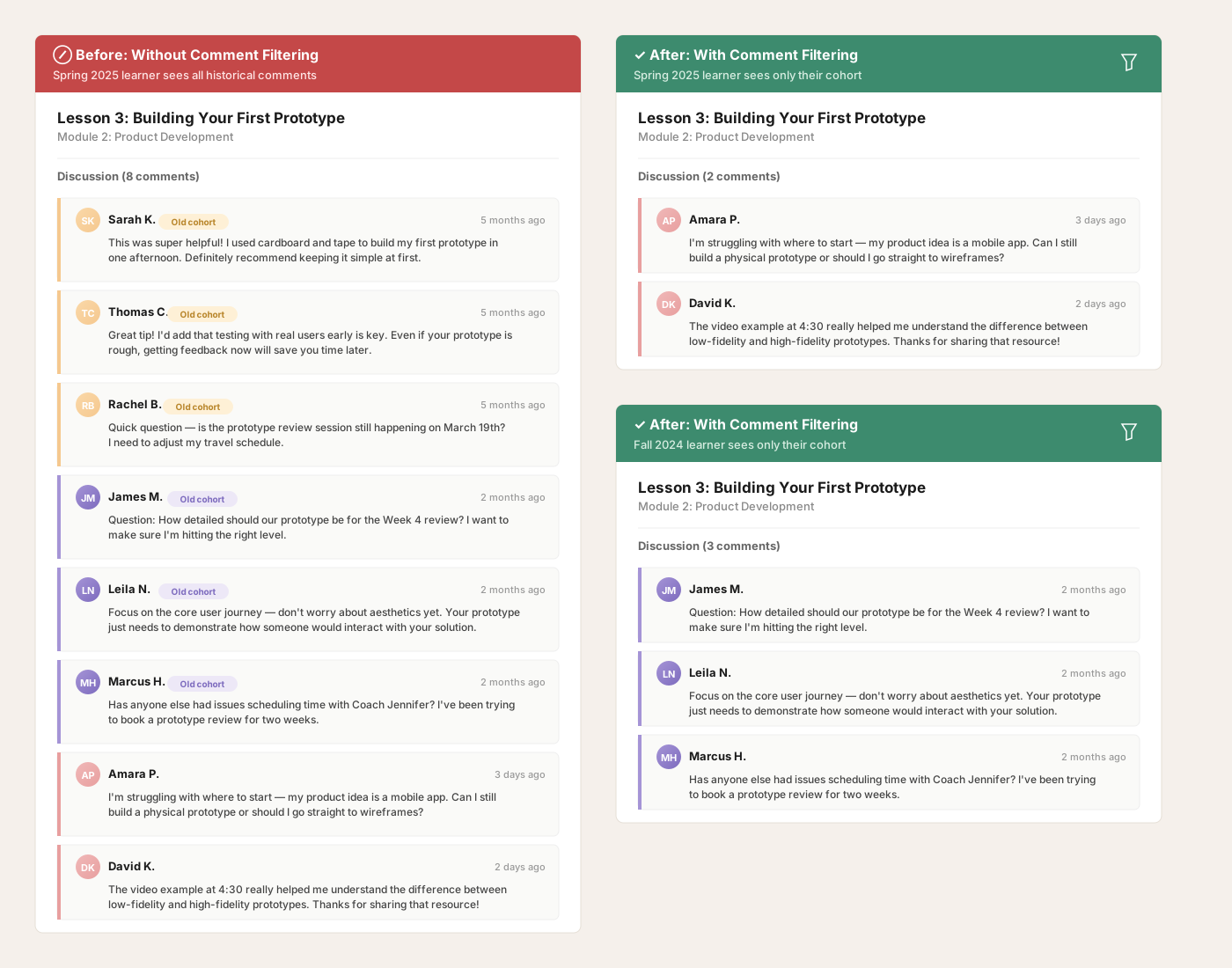
The same lesson, seen by two different cohorts. Each learner sees only the discussions that are relevant to them.
The feature applies specifically to LearnDash lessons and topics where courses are accessed through groups (LearnDash’s mechanism for cohort access). If a course doesn’t use groups, comments behave exactly as WordPress does by default.
Why This Approach
Three principles guided how we approached the solution:
Data must persist. Anzisha runs programs repeatedly and sometimes simultaneously. Deleting or fragmenting discussions would erase valuable insight and make longitudinal review impossible. The platform needed to preserve every comment while controlling visibility.
Admins need unrestricted visibility. Moderation, support, and quality control all require full access. Any solution that hides data from administrators introduces risk. We needed filtering that’s invisible to staff but active for learners.
Filtering should reflect how cohort programs actually run. Learners in the same cohort share pace, milestones, and discussion. The platform should ensure discussions reflect each cohort’s context without forcing people to work around it.
Why Default Solutions Fall Short
When platforms try to solve this problem, they typically reach for one of three approaches:
Wiping or resetting comments between cohorts. This solves the clutter problem but destroys historical insight. Programs lose the ability to review past discussions, track recurring confusion, or improve content based on patterns.
Cloning courses for each intake. This creates separate discussion spaces naturally, but introduces operational overhead. Content updates need to be replicated across multiple courses, and running overlapping cohorts becomes logistically complex.
Moving discussions to external forum tools. This keeps cohorts separated, but pulls learners out of the learning flow and adds another tool to manage. Integration becomes its own maintenance burden.
For Anzisha, none of these tradeoffs were acceptable.
Why Runtime Filtering
Comments are stored normally in WordPress. Nothing is deleted, duplicated, or reassigned. Visibility is determined when comments are queried. The system evaluates current group membership and decides what to show.
This approach avoids migration operations, supports historical data automatically, and stays compatible with WordPress and LearnDash updates. The implementation is small (~40 lines), testable, and reversible.
Because filtering happens at query time:
- Pagination works normally
- Comment counts remain accurate per viewer
- No additional data storage is required
- Historical comments work automatically (evaluated against current viewer’s access, not when they were created)
Implementation Highlights
The feature hooks into WordPress’s pre_get_comments action, intercepting the comment query before it runs.
Admin bypass comes first:
if(current_user_can('manage_options')) {
  return $query;
}
This ensures that administrators always see all comments without restriction.
Group intersection identifies shared context:
$access_group_ids = learndash_get_course_groups($course_id);
$user_group_ids = learndash_get_users_group_ids($user_id);
$user_access_group_ids = array_intersect($access_group_ids, $user_group_ids);
This finds the groups that both grant access to the course and include the current user, which is the cohort context that matters.
Building the allowlist:
$user_ids = [];
foreach($user_access_group_ids as $user_access_group_id) {
  $user_ids = array_merge($user_ids, learndash_get_groups_user_ids($user_access_group_id));
  $user_ids = array_merge($user_ids, learndash_get_groups_administrator_ids($user_access_group_id));
}
$user_ids = array_unique($user_ids, SORT_NUMERIC);
This compiles every user who shares cohort access, including group administrators (who need visibility to support their cohorts).
Applying the filter:
$query->query_vars['author__in'] = $user_ids;
WordPress’s native author__in parameter does the heavy lifting, filtering comments to only those authored by users in the allowlist.
Edge Cases
The implementation handles common scenarios automatically:
- Courses without groups: No filtering applied
- Users without group membership: Comments hidden (they shouldn’t be in the course anyway)
- Multiple simultaneous cohorts: Fully supported, each cohort sees only its own discussions
- Historical comments: Evaluated against current viewer’s access, not when they were created
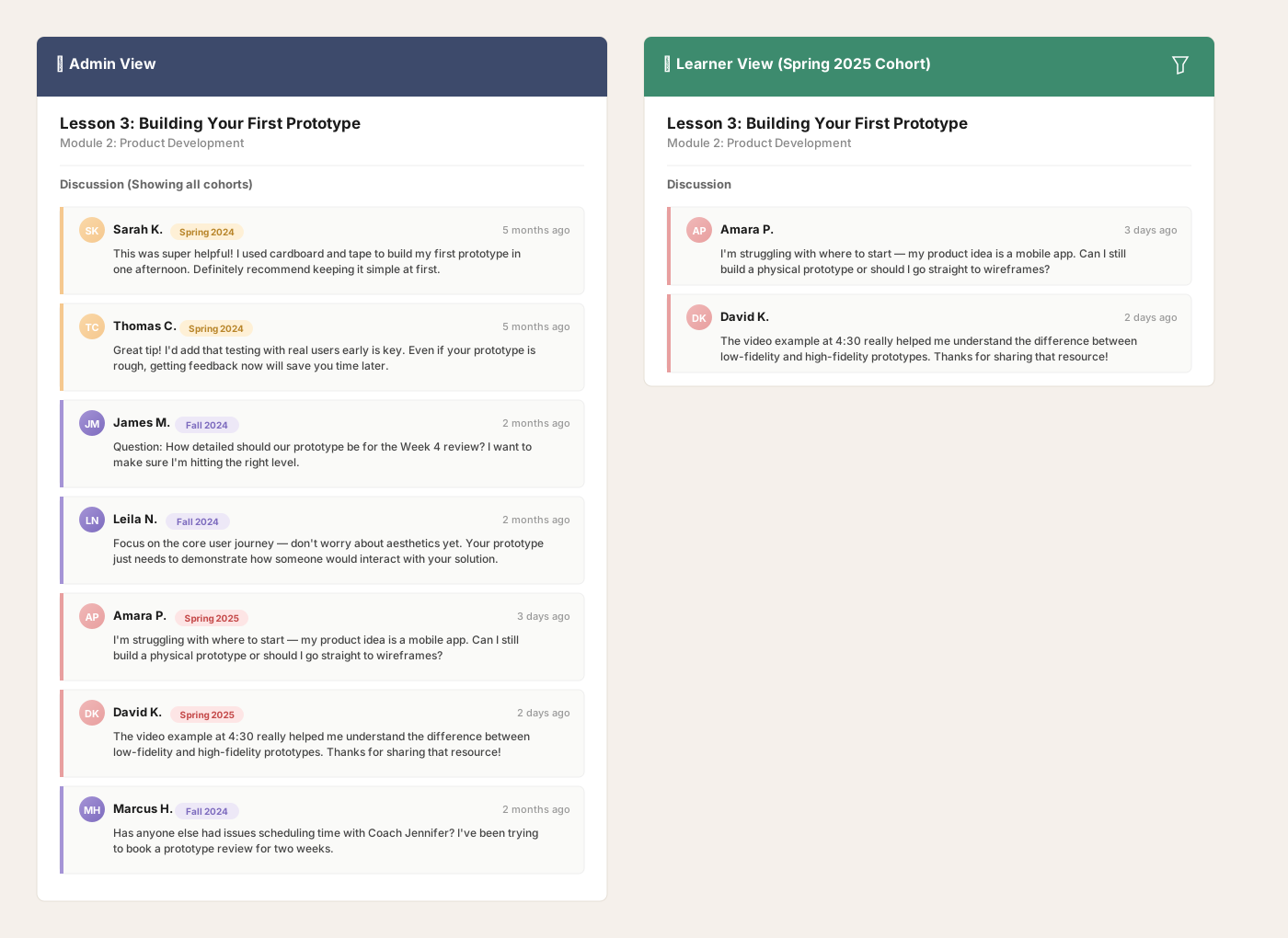
Admins always see the full picture. Learners see only what’s relevant to their cohort.
The Outcome
Comment filtering gave Anzisha what traditional LMS platforms can’t easily provide: the ability to run multiple cohorts simultaneously on the same content without sacrificing discussion quality.
The ~40 line implementation integrates directly with WordPress and LearnDash’s existing architecture with no database migrations, no content duplication, and no operational overhead. Runtime filtering means historical data works automatically, and the system scales naturally as new intakes begin.
Want Something Like This?
When you build cohort awareness directly into your LMS, you remove friction and build trust. Learners feel guided, staff spend less time answering logistical questions, and engagement improves naturally.
At Tangible Inc., we build LMS experiences that go beyond the basics. From cohort-aware discussions to custom learning workflows, we make WordPress LMS sites work the way you need them to.
Let’s talk about how your learners could benefit from smarter discussions.