
Key Points:
Auto-scaling hosting is a server architecture that dynamically allocates resources during traffic spikes, but for most WordPress LMS sites, the distributed infrastructure it requires introduces baseline performance penalties that outweigh the benefit.
– The distinction: Performance (how fast a page loads for one user) and scalability (how many users can be active simultaneously) are different problems with different solutions. Auto-scaling only addresses the latter.
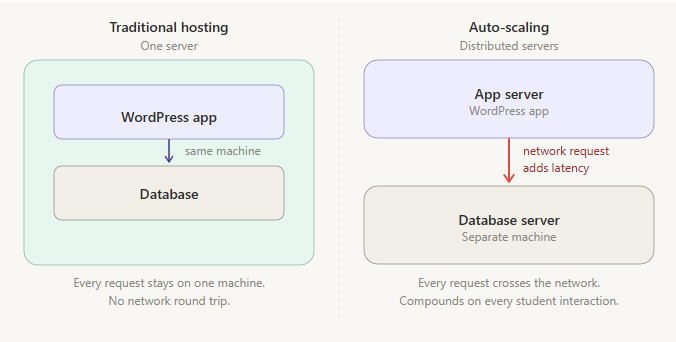
– The architecture problem: Splitting your WordPress application and database across separate servers adds a network round trip to every student interaction. Content that can’t be cached, on every request.
– The threshold: Sites with fewer than 100,000 enrolled students, or that don’t regularly see 1,000+ students active within the same hour, are rarely in genuine scalability territory.
– The test: Evaluate hosting performance as a logged-in student navigating a real course, not front-page load times, which hosts can cache and which tell you almost nothing about LMS performance.
More WordPress hosting companies are offering auto-scaling plans than ever before, and the pitch lands well with LMS site owners. If your site is struggling under the weight of growing enrolments, a hosting approach that automatically adds resources when traffic spikes sounds like exactly what you need.
Before we recommend any hosting change to a client, we ask a question most hosting conversations tend to skip: is this a performance problem, or a scalability problem? The answer usually determines everything, and the two are less interchangeable than most hosting providers imply.
Performance and scalability aren’t the same thing
Performance is about speed: how quickly a page loads for a single user under normal conditions. Scalability is about concurrency: how many users can be active simultaneously before the site starts to degrade. A site can be fast for any individual student and still struggle when a hundred of them log in at once. It can also be consistently slow regardless of how many users are online.
These two problems have different causes and often require different solutions. What’s less commonly acknowledged is that optimising for scalability can introduce real tradeoffs that hurt performance, and vice versa. Getting clear on which problem you’re actually solving matters more than any specific hosting choice.
What auto-scaling actually does, and what it costs
Auto-scaling hosting dynamically allocates additional server resources when traffic increases and releases them when it subsides. On paper this is appealing: you don’t pay for capacity you don’t use most of the time, and you’re not caught short when a course launch brings a sudden influx of students.
In practice, the architecture that makes this possible introduces tradeoffs that aren’t prominent in most hosting conversations. To scale quickly and horizontally, hosts have to distribute your site across multiple servers, typically running your WordPress application and your database on separate infrastructure. When a student loads a course page, the application server has to make a network call to the database server before it can return a response. That round trip happens on every single request, regardless of how much load the site is under.
Think of it like the difference between grabbing flour from your pantry and walking to the grocery store down the block. The grocery store has more flour than your pantry ever could, but every time you need any, you have to make the trip. For a standard content site where most pages can be served from cache, this is a manageable compromise. For an LMS, it compounds quickly. Students are logged in, progressing through courses, completing quizzes, updating their records. Almost none of that activity can be cached. Every interaction hits the database directly. Platforms like LearnDash have specific database interaction patterns that don’t translate well to the distributed multi-server setups that most auto-scaling infrastructure relies on, something specialist LMS hosts have documented independently. The baseline performance penalty is present on every request, not just during surges.
There’s also a practical issue with how auto-scaling handles the surges it’s designed for. Provisioning additional resources takes time, sometimes minutes. Students who arrive during that window still have a poor experience while the system catches up. By the time the extra capacity is live, the surge may already be passing, and the students who needed it encountered a slow or unresponsive site regardless.
Why migrations to auto-scaling seem to work
If the architecture has these tradeoffs, why do so many LMS owners report better performance after switching to an auto-scaling provider?
In most cases, the explanation is simpler than the infrastructure: newer auto-scaling hosts tend to be more generous with resources per dollar than the major traditional providers have become. Large established hosts have had long enough to become complacent: margins tighten, then resource allocation, and the generosity that attracted customers early quietly erodes. A lot of auto-scaling providers are newer entrants that haven’t gone down that road yet, so they’re giving you more to work with per dollar spent.
When you find a traditional host that allocates resources fairly and is configured specifically for the demands of a logged-in, dynamic WordPress platform, it will typically outperform an auto-scaling equivalent for the vast majority of LMS sites. The architectural advantage sits with the traditional setup, as long as the host is giving you enough to actually work with.
How we actually decide
The decision comes down to two questions, asked in order.
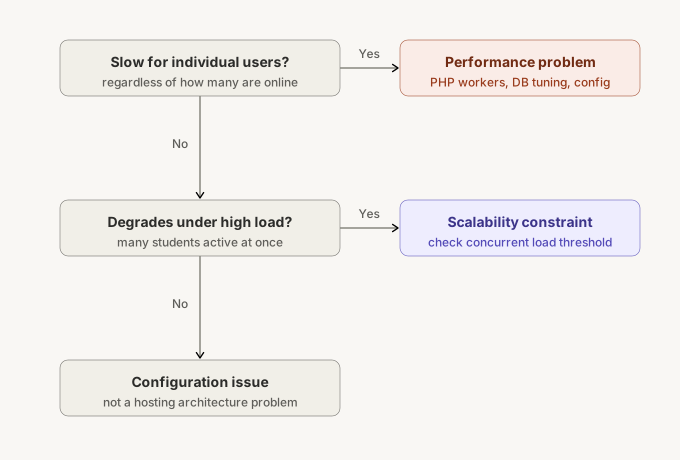
The first is whether the site is slow for individual students under normal load, or only when many students are active simultaneously. If it’s slow regardless of how many people are online, the problem is performance, not scalability. The right answer in that case is a host that allocates generous PHP workers, handles logged-in uncached traffic without degrading, and has optimised its database layer for the kind of frequent, write-heavy queries LMS platforms generate. More distributed infrastructure won’t fix this and may make it worse. LearnDash in particular can introduce specific bottlenecks as enrolments grow that have nothing to do with concurrent load; we’ve written about one notable example in our breakdown of the LearnDash 4.9.0 performance regression.
If performance holds up for individual students but the site degrades when many are active at once, that points to a genuine scalability constraint. Then the second question becomes: what does the actual concurrent load look like? We load test client sites to find their real ceiling under traditional hosting, and consistently find that ceiling is high enough that the overwhelming majority of LMS sites don’t come close to reaching it. Sites with fewer than 100,000 enrolled students, or that don’t regularly see 1,000 or more students active within the same hour, are rarely in genuine scalability territory. For those that are, auto-scaling becomes worth the architectural tradeoffs, but it’s a solution to a specific, demonstrable problem, not a general upgrade.
When evaluating any host, don’t rely on advertised specs alone. Two providers quoting identical CPU and RAM figures can perform very differently in practice depending on how PHP workers are allocated, how the database layer is tuned, and how the infrastructure handles the logged-in dynamic traffic that an LMS generates. The only reliable test is to put real student traffic through a real course and measure response times while logged in, not front-page load times for anonymous visitors, which hosts can cache and which tell you almost nothing about LMS performance.
If you’re seriously evaluating a move, it’s worth paying for a month on two or three providers before committing to one. Every host makes architectural choices that don’t show up in their spec sheets, and a real test under real conditions will tell you more than any benchmark page or sales conversation.
TangibleXP, our hosting platform, is built around exactly these requirements. But we’d apply the same framework regardless of which host you’re evaluating. For LMS site owners weighing these options, or trying to diagnose why their platform isn’t performing as expected, drop us a message.