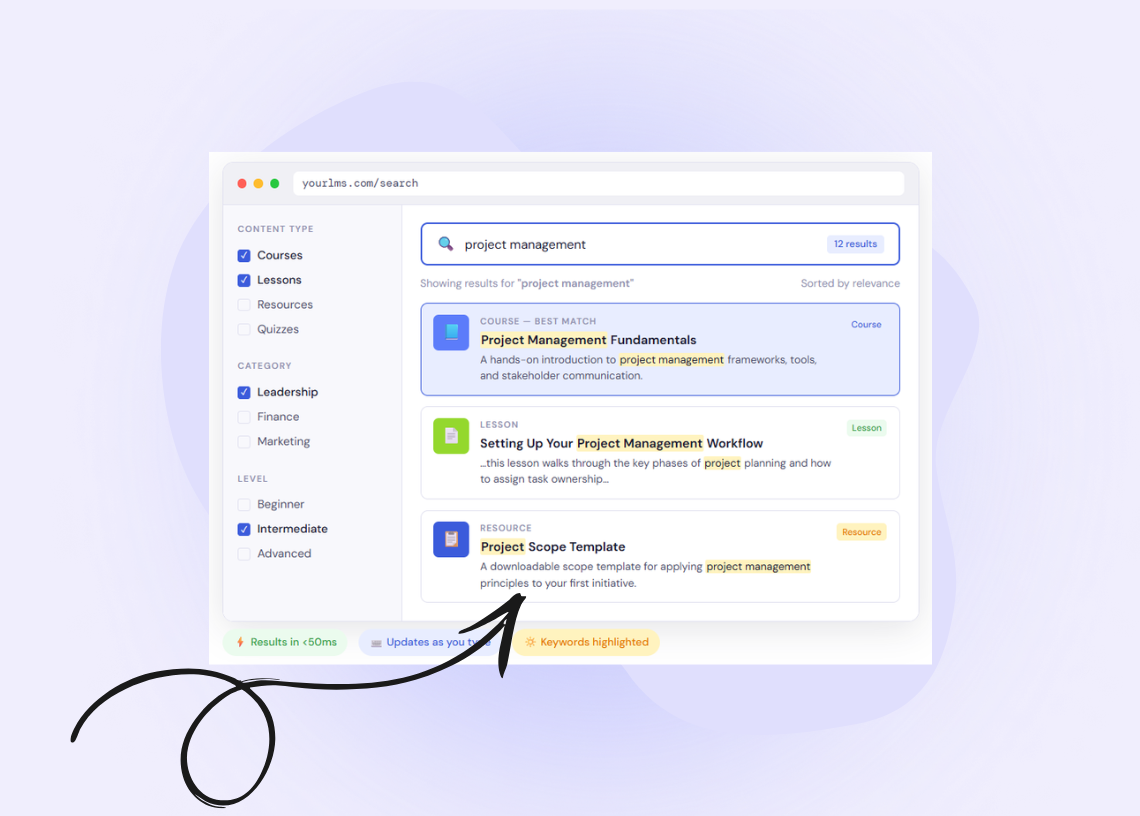
When we think about learning management systems at Tangible Inc., we don’t think in terms of individual plugins or features. We think in terms of stacks — layers of systems that work together to shape the overall learning experience.
Courses, lessons, assessments, and progress tracking are usually what people have in mind when they think about learning platforms. Surrounding those core elements are supporting layers that quietly influence how usable, trustworthy, and polished the platform feels. One of those layers is search, which plays an important role in how learners navigate and discover content.
Search is rarely the make‑or‑break feature of an LMS. A platform can function perfectly well with the original search tools (especially when content libraries are small), but as an LMS grows — adding more courses, more lessons, more resources, and more returning learners — search starts to play a larger role in the overall user experience. It affects how quickly learners find what they need, how confident they feel navigating the platform, and how much friction exists between deciding to learn and actually starting to learn.
This matters more in LMS environments than on many other types of websites, because they tend to accumulate large bodies of structured content over time. Their users are often goal‑oriented, arriving with specific questions or topics in mind rather than browsing casually. And unlike one‑off visits to marketing sites, learners return repeatedly, which makes time‑to‑answer and consistency especially important.
Because of this, when we’re designing or augmenting LMS sites, we often look beyond default search functionality and consider tools that are purpose‑built for fast, relevant content discovery. One of those tools is Algolia. Algolia is a modern search platform that we consider part of an ideal LMS stack in the right contexts. It doesn’t replace an LMS or its core features. Instead, it augments the search layer — providing a foundation for faster queries, more relevant results, and more intentional search experiences as content scales.
How Algolia Works
Before looking at specific LMS use cases or outcomes, it’s useful to understand how Algolia works at a system level. Not in terms of APIs or code, but in terms of responsibilities: what work is done ahead of time, what happens at search time, and how decisions about relevance are made.
At a high level, Algolia-powered search is built around a simple idea: search should be fast and predictable because most of the heavy work has already been done before a learner ever types a query.
To achieve this, Algolia separates search into three distinct processes:
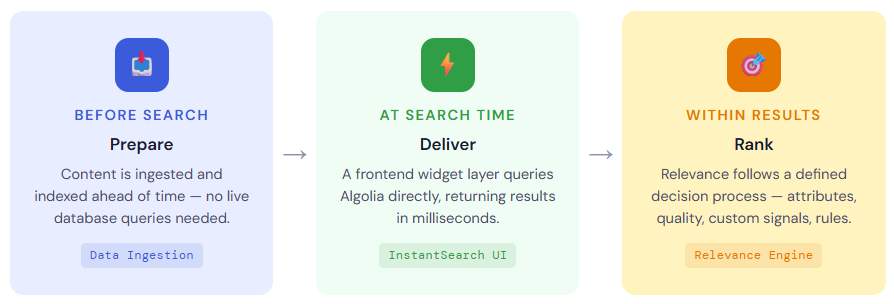
Each of these processes plays a different role, and together they explain why Algolia behaves very differently from default LMS or WordPress search.
Preparing Content for Search
Algolia does not crawl your LMS like a search engine, and it does not query your live database when someone searches. Instead, searchable content is sent to Algolia ahead of time, where it is stored in a structure designed specifically for fast lookup.
A helpful way to understand this is to think of your WordPress database as a textbook. The textbook contains everything: full chapters, paragraphs, footnotes, and context. It’s complete and authoritative, but it’s heavy. Searching it directly is like flipping through every single page, line by line, every time someone wants to find a term. That works, but it’s slow and resource-intensive.
Traditional database-backed search works in much the same way. When a learner submits a query, the system has to scan through large amounts of raw content to see what matches. As content grows, that process becomes increasingly expensive.
Data ingestion takes a different approach. Instead of searching the textbook over and over, you hire a scribe to read it once. That scribe extracts the important terms and concepts, writes them onto index cards, and files those cards into a well-organized cabinet. That cabinet is Algolia.
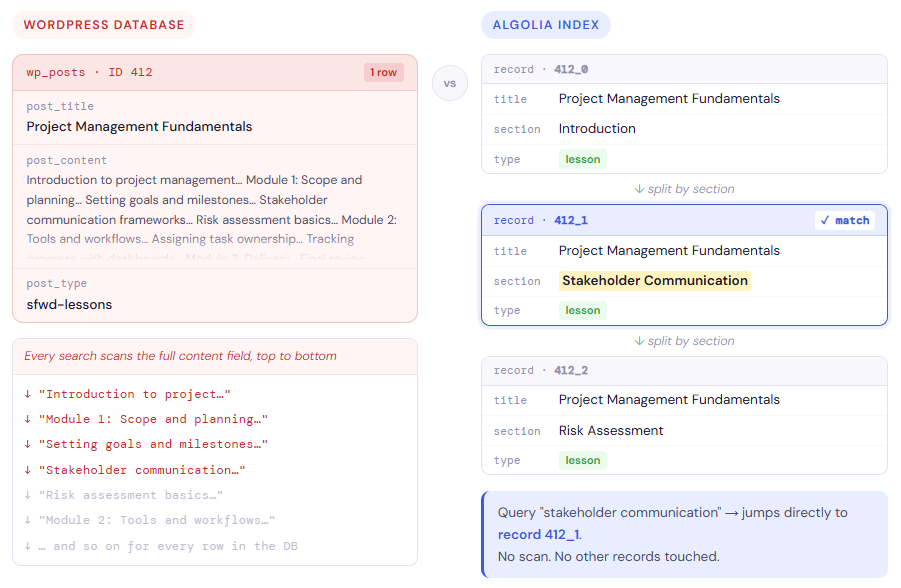
Each index card represents a record — a small, self-contained piece of searchable content that Algolia can retrieve extremely quickly. Every record has a unique identifier, so it can be updated or replaced without touching anything else.
This is also where record splitting comes in. A single chapter is often too long to fit on one index card. Rather than forcing everything onto a single card, the scribe writes that chapter across multiple cards — for example, one per lesson section or transcript segment — and links them together so they still refer back to the same source material.
The result is that learners aren’t searching the entire textbook anymore. They’re searching the index cards. Algolia can scan those cards almost instantly, find the most relevant ones, and point back to the exact course or lesson they came from.
By doing this work ahead of time, Algolia avoids expensive database queries at search time. The LMS stays focused on delivering learning content, while search remains fast, predictable, and consistent — even as content volume and traffic grow.
Delivering Search Results Through a Dedicated Search Interface
Once content has been prepared for search, Algolia’s role shifts from indexing to interaction. Rather than dictating how search should look, Algolia provides the engine and a set of tools for building a dedicated search interface inside the LMS.
To support this, Algolia provides a set of frontend libraries under the InstantSearch name, available for JavaScript frameworks like React and Vue, as well as for vanilla JavaScript. These libraries are built around widgets: pre-built components that handle common search interface tasks.
Instead of building everything from scratch, you compose an interface using widgets such as a search box, a results list, pagination controls, and refinement lists for filtering. Each widget knows how to communicate with Algolia, manage its own state, and update automatically when the query changes. You can use these widgets as-is, or customize their appearance and behavior to match your branding.
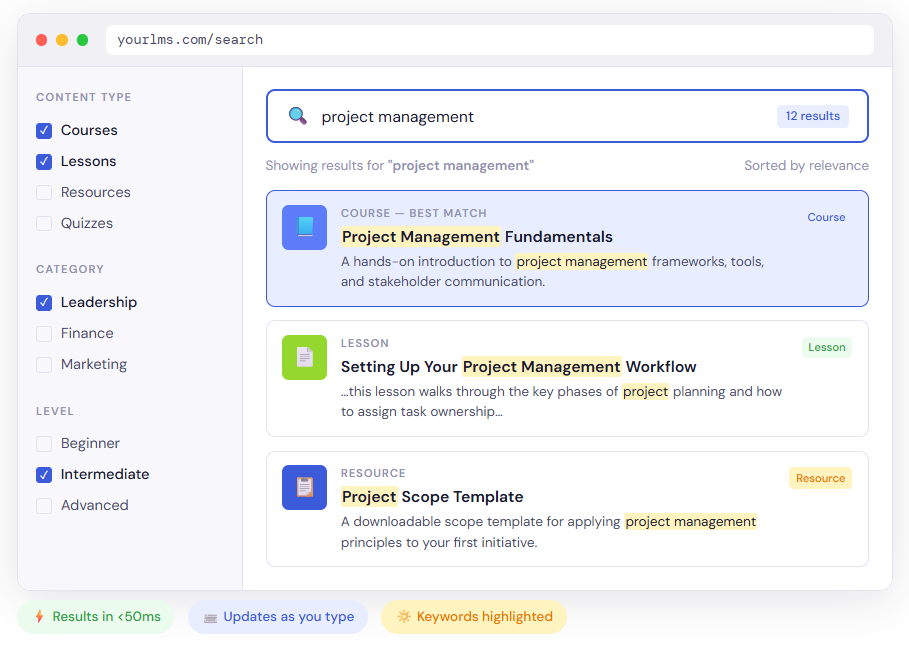
This widget-based approach is what makes search-as-you-type possible. As a learner types, the widgets in the browser send lightweight requests directly to Algolia’s API and update the results immediately — typically under 50 milliseconds. There is no form submission, no page reload, and no server-side query running inside WordPress for each keystroke.
Implementation detail
In practice, search-as-you-type interfaces are typically lightly debounced, meaning the system waits a fraction of a second after typing stops before sending a request. This helps balance responsiveness with efficiency, avoiding unnecessary queries while preserving the fluid experience learners expect.
Because the interface lives on the frontend, it can also reflect the structure of a learning platform. Courses, lessons, and resources can be rendered differently. Filters can be added for course categories, difficulty levels, or instructors. Highlighting can be used to show why a result matched — for example, surfacing a specific sentence from a lesson transcript where the search term appears.
From a system perspective, this design is just as important as the user experience. Search interactions bypass the LMS backend entirely, which means the platform is not burdened with handling live search queries. It remains focused on delivering learning content, while Algolia handles search state, filtering, and ranking independently.
In WordPress-based LMS sites, the specific implementation details can vary widely. Some teams use existing integrations, others build custom search interfaces directly into their themes or frontend applications. What matters is not the exact tooling, but the pattern itself: the search interface operates as a frontend-driven layer that communicates directly with Algolia, rather than relying on form submissions and live database queries inside WordPress.
The result is a search experience that feels immediate and flexible to learners, while remaining cleanly decoupled from the LMS’s core responsibilities.
Determining Which Results Matter Most
Matching keywords is only part of search. Equally important is deciding which matching results should appear first.
A helpful way to understand how Algolia handles relevance is to imagine you’re hiring a professor.
First, you establish baseline qualifications. A candidate who actually holds a PhD in the subject is more relevant than someone who merely mentions the topic in passing on their résumé. In search terms, this is the idea behind searchable attributes: where a match occurs matters. A course title match should usually carry more weight than a brief mention inside a transcript.
Next comes tie‑breaking. If two candidates both have the right degree, you start looking for quality signals. Perhaps one applicant misspelled “Physics” on their application. That doesn’t automatically disqualify them, but it might lower confidence. Algolia applies similar logic through typo tolerance and textual quality checks, preferring cleaner, more confident matches when everything else is equal.
If candidates are still evenly matched, you move on to custom ranking criteria. This is where business or educational priorities come into play. One professor may have more years of teaching experience, better evaluations, or deeper specialization. In an LMS, this might translate to enrollment numbers, completion rates, recency, or other metrics that signal importance beyond the text itself.
Finally, there are rules. Occasionally, an external decision overrides the normal process — for example, the dean calls and insists on hiring a specific candidate regardless of the usual criteria. Algolia supports this kind of explicit override through rules such as pinning or merchandising, allowing certain results to appear first no matter what the algorithm would otherwise decide.
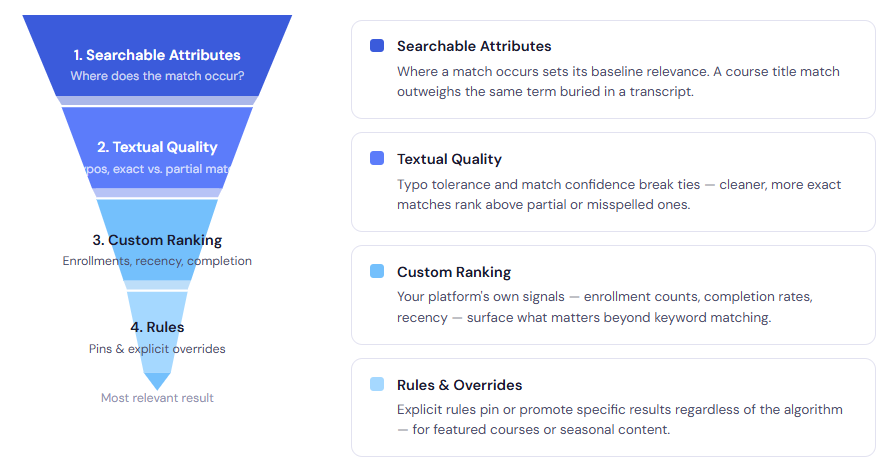
Taken together, this is how relevance becomes intentionally opinionated. Algolia doesn’t try to guess what matters. It follows a structured decision process that you define, applying qualifications, tie‑breakers, rankings, and overrides in a clear order. The result is search behavior that aligns with educational intent, not just keyword coincidence — even when queries are imperfect or ambiguous.
Think Your WordPress LMS Could Use Better Search?
LMS search features are rarely something users think about consciously, but it has a noticeable effect on how the platform feels to use. When search is treated as an intentionally designed system (as opposed to the default system) it becomes easier for learners to orient themselves, find relevant material, and move through content with confidence.
This is where Algolia fits. It augments the search layer by making its behavior explicit and configurable. Content is prepared ahead of time, relevance is defined through clear priorities, and search interactions are handled independently of the LMS backend. The result is a search experience that is faster, more predictable, and easier to align with educational goals.
That doesn’t mean Algolia is the right choice for every LMS. Smaller platforms or tightly scoped course libraries may be well served by native search. But as content grows and UX expectations rise, the limitations of default search become more apparent. In those cases, tools like Algolia offer a way to treat search as part of the platform’s architecture rather than an afterthought.
At Tangible Inc., we look at LMS sites as layered systems, where each component contributes to the overall experience. Search is one of those components. When it matters, Algolia is a tool we often consider as a way to bring more intention, clarity, and control to how learners discover content.
If search is starting to matter more in your LMS, let’s talk.