
Key Points:
LMS concurrency is a measure of simultaneous server demand that determines whether your platform stays responsive when multiple learners are active at once, and it behaves very differently from concurrency on a standard website.
– The problem: Hosting providers each measure concurrency against their own definition of a “normal” site, making their advertised figures virtually impossible to compare across providers
– Why LMS is different: Unlike static sites, LMS platforms can’t cache most activity: every quiz submission, progress update, and score calculation generates a live server request
– What actually drives it: Three factors determine your real requirements: how assessment-heavy your courses are, whether your users are self-paced or scheduled, and how lean your tech stack is
– A more reliable signal: PHP workers are the number of concurrent processes a plan can run and are a better comparison point than headline user counts
– Real-world numbers: Our load testing on a medium-complexity LearnDash site found a practical ceiling of around 20 simultaneous quiz submissions per second on a well-tuned server; comparable tests on other hosts found failure points as low as 7
If you’ve spent time shopping for LMS hosting, you’ve probably run into a version of this problem. Plans at similar price points claim wildly different concurrency support: one might advertise 150 concurrent users for roughly $900 a month, another promises 1,000 for $800, and a third makes the same 1,000-user claim for less than $30.
None of those numbers are outright false. But they’re not measuring the same thing, and comparing them across providers will almost certainly steer you wrong.
Concurrency matters more for LMS sites than for most types of websites, and for specific reasons that are worth understanding. It’s also one of the most inconsistently reported metrics in the hosting industry. Getting clear on what it actually means, what drives it, and how to think about it when evaluating a provider can save both you from overpaying and unknowingly setting yourself up for problems down the line.
What concurrent users actually means
Concurrency refers to the number of simultaneous requests a server can process at any given moment. A request is generated whenever a user takes an action that requires the server to respond: loading a page, submitting a form, completing a quiz, recording progress.
What matters for your site is peak concurrency: the maximum number of simultaneous requests your server needs to handle during your busiest moments. Not the average over the course of a day. The peak.
When hosting providers advertise support for a specific number of concurrent users, they’re nominally describing this same concept. The problem, as we’ll get to, is that they’re each measuring it against a very different picture of what “busy” looks like.
This distinction matters because a server handling 500 requests spread across an hour behaves very differently from one that needs to handle those same 500 requests in the same second. The total volume is equal. The experience for your students is not.
Why concurrency is a bigger deal for LMS sites
Most websites are primarily static. A brochure site, a blog, most e-commerce storefronts all deliver broadly the same content to every visitor, which makes two powerful optimisations available: caching and content delivery networks (CDNs). These serve pre-built copies of your pages without touching the server at all. A site with millions of visitors can generate relatively modest server load if it’s properly cached.
LMS sites are fundamentally different. Students are logged in, progressing through personalized learning paths, completing assessments, and having their scores recorded. Almost none of that activity can be cached, because the server needs to know exactly where each student is and what they’ve done, and that changes constantly. Every meaningful interaction generates a real server request.
The most demanding interaction is a quiz submission. When a student submits a quiz, the server has to evaluate each answer, calculate a score, check whether the student has met the completion threshold, update their progress record, and potentially trigger the next step in their course, all before returning a response. At high concurrency, those simultaneous database writes don’t just slow down in parallel; they queue behind each other at the database layer. In extreme cases this produces table-level locks, where a backlog of writes prevents any new ones from completing until the queue clears, cutting off write access for every user at once. It’s a failure mode specific enough to LearnDash’s architecture that dedicated LMS hosts have written about it in technical detail.
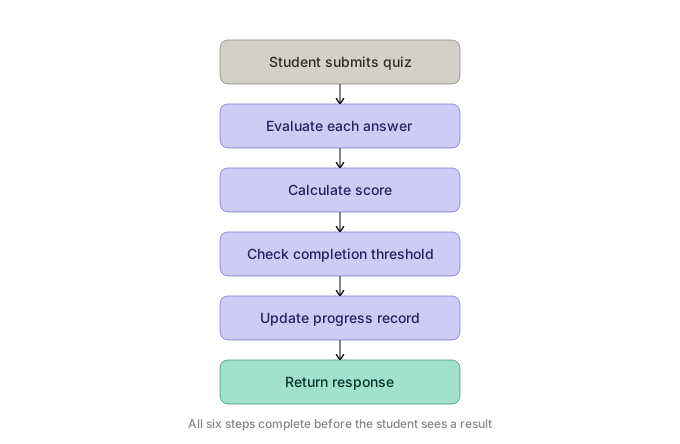
In our testing on a medium-complexity LearnDash installation running on a well-tuned server, the practical ceiling is around 20 of these requests handled simultaneously before response times begin to degrade noticeably.
That number is more forgiving than it sounds. Even if 1,200 students all start the same quiz at the same time, natural variation in how long each person takes will spread their submissions across several minutes. The server doesn’t see 1,200 requests in the same second; it sees something closer to 20 per second, sustained. The risk increases when students are encouraged to interact with the site at a particular, shared time: a lesson going live for an entire cohort, an email blast driving mass simultaneous logins, or a live event where hundreds of students submit at once.
Why the numbers are impossible to compare
This is where most concurrency conversations go wrong.
A general-purpose WordPress host calibrates their “concurrent users” benchmark against the sites they mostly serve: largely static, aggressively cached, with very few server requests per visitor. A specialist LMS host calibrates against something far more dynamic. Both numbers are accurate within their own frame of reference. They’re just measuring entirely different versions of “normal.”
Three factors account for most of the variation between LMS sites specifically.
Course structure matters more than most people expect. A course where students watch videos at their own pace generates far less server load than one with a short quiz after every lesson. The more assessment-heavy your course design, the higher your concurrency requirements at any given student volume.
Scheduling patterns matter just as much. Self-paced courses spread traffic naturally across time zones and individual schedules. Cohort-based programs, dripped content, live events, and email campaigns all create synchronised spikes that compress concurrent demand significantly. One traffic-driving email sent to your full list at 9am on a Monday is a very different concurrency event than the same number of sessions spread over a week.
Your tech stack compounds everything else. Every additional plugin, page builder, heavy script, or poorly optimised asset increases the cost of each server request. A leaner site handles more concurrent load from the same infrastructure. A feature-rich site with multiple integrations may need substantially more headroom to achieve the same response times.
Because every LMS has a different course structure, a different schedule, and a different technical configuration, there’s no meaningful way to compare a “1,000 concurrent users” claim from one provider with the same claim from another. You can compare plans within a single host. Across hosts, those numbers describe different things entirely.
Estimating your own numbers
Before evaluating any provider, it helps to develop a rough sense of your own concurrency profile. Two approaches work well together.
The first is estimation. Start with your active user base and think about what fraction is likely to be on the platform simultaneously. For asynchronous, self-paced courses, this might be 1–5% of enrolled students at any given time. For scheduled programs where new content becomes available at a fixed time, or where email campaigns drive simultaneous logins, that fraction can spike considerably higher during those windows. The useful question isn’t how many students you have, but how many are likely to be submitting a quiz in the same ten-second window at your busiest moment.
The second is historical data. Google Analytics can give you a useful proxy: the realtime and hourly active user views show how many concurrent sessions your site sustains during peak periods. This won’t translate directly to server requests per second, but it gives you a baseline to work from and a sense of how your traffic is shaped over time.
What to actually look for
Given that top-line concurrency claims aren’t a reliable comparison point, here’s what tends to be more useful.
Look for PHP workers rather than vague concurrent-user figures. A PHP worker is a single process that handles one server request at a time. The number of workers a plan provides is a more direct proxy for concurrency capacity than any marketing number, though the underlying hardware matters too, and a host could advertise suspiciously high worker counts that the server can’t fully utilize. It’s an imperfect signal, but a more honest one.
Look for LMS-specific or plugin-specific plans. Providers who have configured their infrastructure for dynamic, login-heavy sites perform very differently from general WordPress hosts at similar price points. The best will name the specific LMS platforms they’ve optimised for.
Reach out directly with your actual situation. Describe your approximate student volume, your peak traffic windows, how quiz-heavy your courses are, and your plugin configuration. Most serious providers will give you a personalized assessment. That conversation is worth more than any spec sheet.
What real numbers look like
Our load testing on a medium-complexity LearnDash site, running on a well-configured server, puts the practical ceiling at around 20 simultaneous quiz submission requests per second before response times start to queue. Short spikes above that are manageable: if 30 students submit in the same second, the 10 who have to wait recover quickly. Sustained load above that threshold is the real problem: the queue keeps growing, and response times get progressively worse until the backlog clears.
To understand what “well-configured” actually means in practice, we’ve run the same tests against other popular WordPress hosts. The differences are significant. The well-tuned server we tested handled sustained spikes before showing major failures around the 3,500 simultaneous request mark. A well-known WordPress hosting service in the LMS space failed at around 25–50. A third provider collapsed at 7.
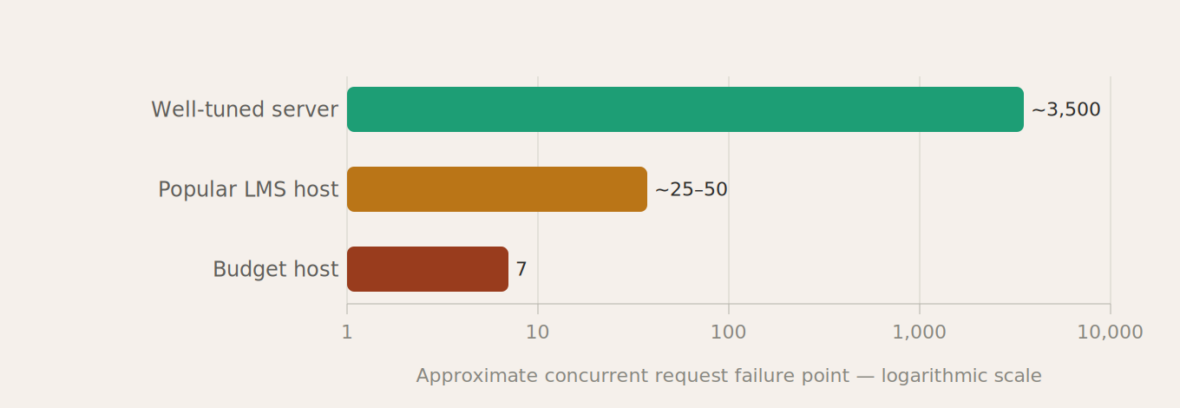
These aren’t permanent rankings. Configurations change, and individual results depend heavily on how a site is built. But the range illustrates why comparing headline concurrency figures across providers is essentially meaningless. The spread between providers isn’t measured in percentage points. It’s measured in orders of magnitude.
Those results are consistent with what other LMS practitioners have observed. Uncanny Owl, a specialist LearnDash agency, ran load tests across WP Engine, Kinsta, and Cloudways and documented significant performance deterioration above 100 simultaneous users, with results that varied considerably between providers at similar price points.
Taking the next step
Knowing your concurrency profile doesn’t tell you which host to pick, but it gives you the right frame for the decision. Once you know roughly what your peak looks like (in terms of student volume, quiz intensity, and scheduling patterns), you can have a much more productive conversation with providers, and cut through the marketing numbers that make comparison difficult.
For LMS site owners working through that decision, we’ve written separately about how we decide between scalable and traditional hosting, which addresses the next set of tradeoffs once concurrency requirements are understood.
At Tangible Inc., concurrency testing is a standard part of how we evaluate hosting options and plan migrations. It’s also one of the reasons we built TangibleXP, our own hosting platform, configured specifically for the kind of dynamic, login-heavy LMS workloads this article has been describing. If you’re not sure where your site stands, or what it can realistically handle, that’s usually the right place to start.
Get in touch if you’d like to think it through.