Key Points:
LearnDash offers two ways to enroll users in courses, and the choice between them affects database performance far more than most site owners expect as your site grows.
– The two paths: Direct enrollment records access on a per-user, per-course basis. Group enrollment records a single membership per user, regardless of how many courses the group contains.
– Why it matters at scale: Direct enrollment record counts grow as users multiplied by courses. Group enrollment records grow only with user count.
– Where the gap shows up: Subscription renewals, retroactive course additions, and admin reporting are the operations where direct enrollment carries the most overhead.
– Measured difference: In our testing on a site with 75 subscribers and 50 courses, adding a new course to the bundle ran 7 database queries via group enrollment versus 674 via direct enrollment.
– When direct still fits: One-off, permanent course purchases involving a single payment with no ongoing subscription work fine with direct enrollment.
A LearnDash site that starts out fast rarely feels slow in year one. Pages load quickly, admin reports generate without complaint, and access permissions hold. Then user counts climb, course catalogs expand, and performance starts to slip. Course pages load more slowly. The admin dashboard lags. Subscription renewals don’t reliably update access.
The usual checks come first: hosting resources, caching configuration, plugin conflicts. Those changes sometimes help, but the relief is usually temporary. We’ve written separately about one specific culprit introduced in a recent LearnDash update that’s worth reading alongside this. What tends to go unexamined is something more basic: how users are enrolled into courses.
Enrollment method determines both database load and how reliably access updates when a subscription renews. On a small site, the difference is barely noticeable. As user counts and course catalogs grow, it becomes the difference between a system that holds up and one that gradually works against you.
Two Ways to Grant Course Access
LearnDash gives you two ways to enroll users into courses: directly, or through a group.
Direct enrollment is the more intuitive approach. A user purchases a course, signs up for free access, or gets manually added by an admin, and LearnDash records that specific user’s access to that specific course. Each enrollment is its own record, tied to that user.
Group enrollment works differently. Instead of assigning courses to users directly, you assign courses to a group, then add users to that group. LearnDash resolves access through the group membership. The courses themselves don’t need to track individual users.
Both result in a user accessing a course. The difference is in how LearnDash represents and checks that access, and how that representation holds up at scale.
What’s Happening Under the Hood
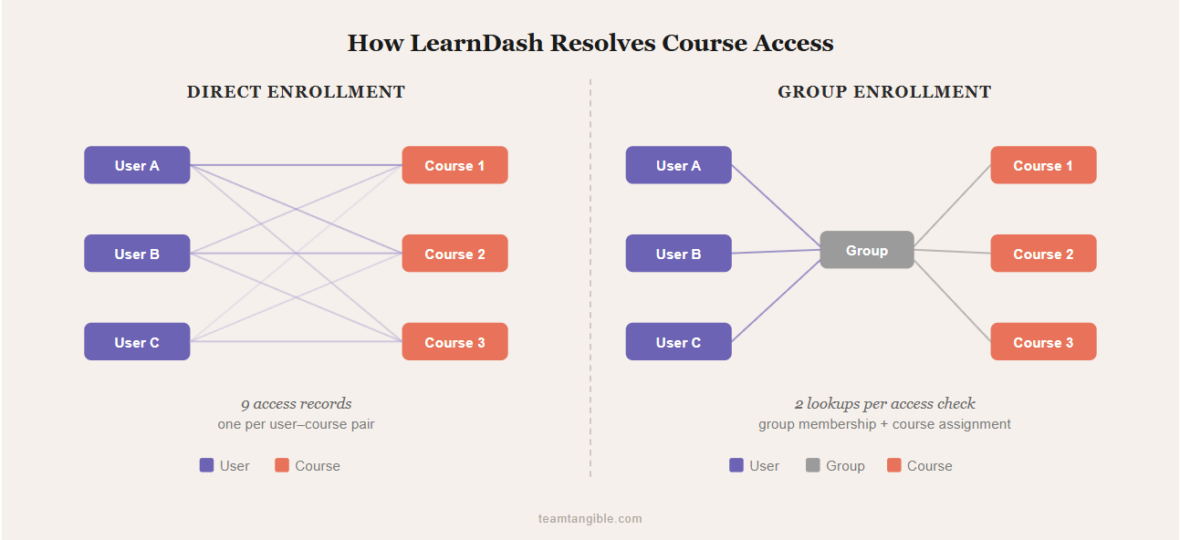
When a user is directly enrolled in a course, LearnDash stores a course_<id>_access_from entry in WordPress’s user meta table, where <id> is the course ID. One row for that user and that course, containing a timestamp of when access was granted. If that entry exists for a given user-course pair, the user has access.
With 10 users and 50 courses, that’s 500 rows. With 1,000 users and 50 courses, 50,000 rows.
Group enrollment restructures the data. When a user joins a group, LearnDash records a single learndash_group_users_<group_id> entry for that user. The course-side gets a similar treatment: assigning a course to a group writes a learndash_group_enrolled_<group_id> entry on the course. To determine whether a user can access a course, LearnDash asks two questions in sequence: is this course assigned to any groups, and is this user a member of any of those groups? Two lookups, regardless of how many courses the group contains.
The table below shows how record counts diverge as users scale:
| Users | Courses | Direct records | Group records |
|---|---|---|---|
| 10 | 50 | 500 | 60 |
| 100 | 50 | 5,000 | 150 |
| 1,000 | 50 | 50,000 | 1,050 |
These records are queried on every page load, access check, and report. Each active user triggers their own set of access checks independently. Ten simultaneous users querying against 50,000 enrollment records loads the database differently than the same users querying against 1,050.
For the technically curious:
The query LearnDash uses to find a user’s direct enrollments forces MySQL into a partial index lookup. The database can narrow the search but then has to scan and discard a portion of the candidate rows. The equivalent group lookup uses an exact-match index that scales gracefully as your site grows. As your user-meta table grows, the direct-enrollment query slows in ways the group query doesn’t. The gap widens with scale.
Where Enrollment Method Affects Performance
Subscription and membership renewals. When a subscription renews, access often needs to be revoked and then restored to apply the new billing cycle. Depending on the subscription plugin, a pending payment can also trigger that revoke-and-restore cycle. With direct enrollment, this means writing and deleting a user-meta entry for every single course covered by the subscription. With group enrollment, the same renewal touches a single group membership record. Add or remove the user from the group, and access to all associated courses updates in one step.
In our testing on a site seeded with 75 subscribers and 50 courses per subscription bundle, a single user’s renewal cycle looks like this:
| Operation | Direct enrollment | Group enrollment |
|---|---|---|
| Revoke access to 50 courses (one user) | 249 queries | 5 queries |
| Grant access to 50 courses (one user) | 429 queries | 12 queries |
| Total per renewal cycle | 678 queries | 17 queries |
A renewal cycle is one revoke followed by one re-grant, so each total is the sum of the two rows above.
That’s the same end result, with the same user and the same access surface, at roughly 40× the database work. On a site with regular renewal activity and multiple users renewing on overlapping schedules, those operations accumulate quickly.
Adding or removing courses from a subscription. This is where direct enrollment becomes a problem at scale. When you add a new course to a subscription and want existing subscribers to have access, direct enrollment requires a retroactive sync across every active subscriber. LearnDash has no dedicated tool for that. You’re left with a bulk CSV import or a custom script, and in our experience both get slow and unreliable at scale, often leaving a portion of users without the access they should have.
With group enrollment, adding a course to the group grants access to every member immediately, without touching a single user record. In the same testing setup as above (75 existing subscribers, one new course added to the bundle), the comparison is sharper still:
| Operation | Direct enrollment | Group enrollment |
|---|---|---|
| Add 1 new course to a 75-subscriber bundle | 674 queries | 7 queries |
Worth noting:
The group counts aren’t quite zero-write: LearnDash still records one activity row per user-course pair for reporting, written as a single bulk insert and already included in the totals above. Unlike direct access records, those rows are written once at enrollment, not re-queried on every page load.
Removing a course from the group works the same way: remove it once, and it’s gone for all members. With direct enrollment, there’s no reliable way to do this retroactively across a large subscriber base.
Admin pages and reports. Course edit pages, user management views, and reporting dashboards run heavier queries against large direct enrollment datasets. These pages contribute to the admin slowdowns that many site owners attribute to hosting or traffic. The enrollment data volume is usually the real cause.
When Direct Enrollment Still Makes Sense
Direct enrollment fits one-off course purchases: a user pays once for a single course and gets permanent access. There’s no subscription status to track, no group to maintain. Write the record once and leave it.
If access is permanent and tied to a single purchase, direct enrollment is appropriate. If access is ongoing, contingent on a subscription status, or covers multiple courses that may change over time, group enrollment is the better fit.
Getting Started With Groups
LearnDash includes group functionality natively, with no additional plugins required. The setup has three steps:
- Create a group under LearnDash LMS > Groups
- Assign courses to the group
- Enroll users into the group rather than directly into courses
For sites using e-commerce or membership plugins, connect the subscription or membership product to a group, not a list of individual courses. Access is managed through the group from that point. Add or remove a course, and the change applies to all members automatically.
LearnDash’s documentation covers the group setup in detail:
Worth noting:
LearnDash’s native group features handle access management well, but keeping group membership in sync over time is largely a manual process. As sites grow and access rules become more dynamic, that maintenance can require additional tooling or custom workflows. We’ll cover that in a separate article.
Enrollment structure doesn’t announce itself as a problem. It raises the cost of access checks, renewals, reports, and subscription management. Getting it right is less about development work than about making a structural decision early, while the site is still small enough to change easily.
At Tangible Inc., enrollment is one of the first things we look at when auditing or building a LearnDash platform. It shapes how reliably access works and how much overhead every other optimization has to overcome. If you’re building a subscription-based LMS, selling access through memberships rather than individual courses points toward the same conclusion.
If you’re planning to grow your LearnDash site, or already feeling the strain, let’s talk.
Frequently Asked Questions
Why is my LearnDash site getting slower as it grows?
One thing that tends to go unexamined is the volume of direct enrollment records in your database. Hosting and traffic usually take the blame first, but the records are often what’s actually slowing things down. Each direct enrollment creates a row in WordPress’s user-meta table per user-course pair, and those rows are read on every page load, access check, and report. Switching to group enrollment replaces that growth pattern with a single membership record per user, regardless of how many courses the group contains.
Why aren’t my LearnDash subscribers getting access to newly added courses?
If your site uses direct enrollment, adding a new course doesn’t retroactively grant access to existing subscribers. You’d have to enroll each user into the new course, and LearnDash has no dedicated tool for doing that across an existing subscriber base. The closest options are a bulk CSV import or a custom script, and in our experience both get slow and unreliable at scale. With group enrollment, adding a course to the group grants immediate access to every member without touching individual user records.
Does switching from direct to group enrollment require migrating existing enrollments?
LearnDash doesn’t provide a built-in tool to convert existing direct enrollments into group memberships. The two paths run side by side, so existing direct enrollments continue to work alongside any new group memberships you add. If you want to consolidate everyone onto group access, you’ll need a one-time migration: either via a custom script or by carefully removing the direct enrollments after confirming each affected user has equivalent group access.