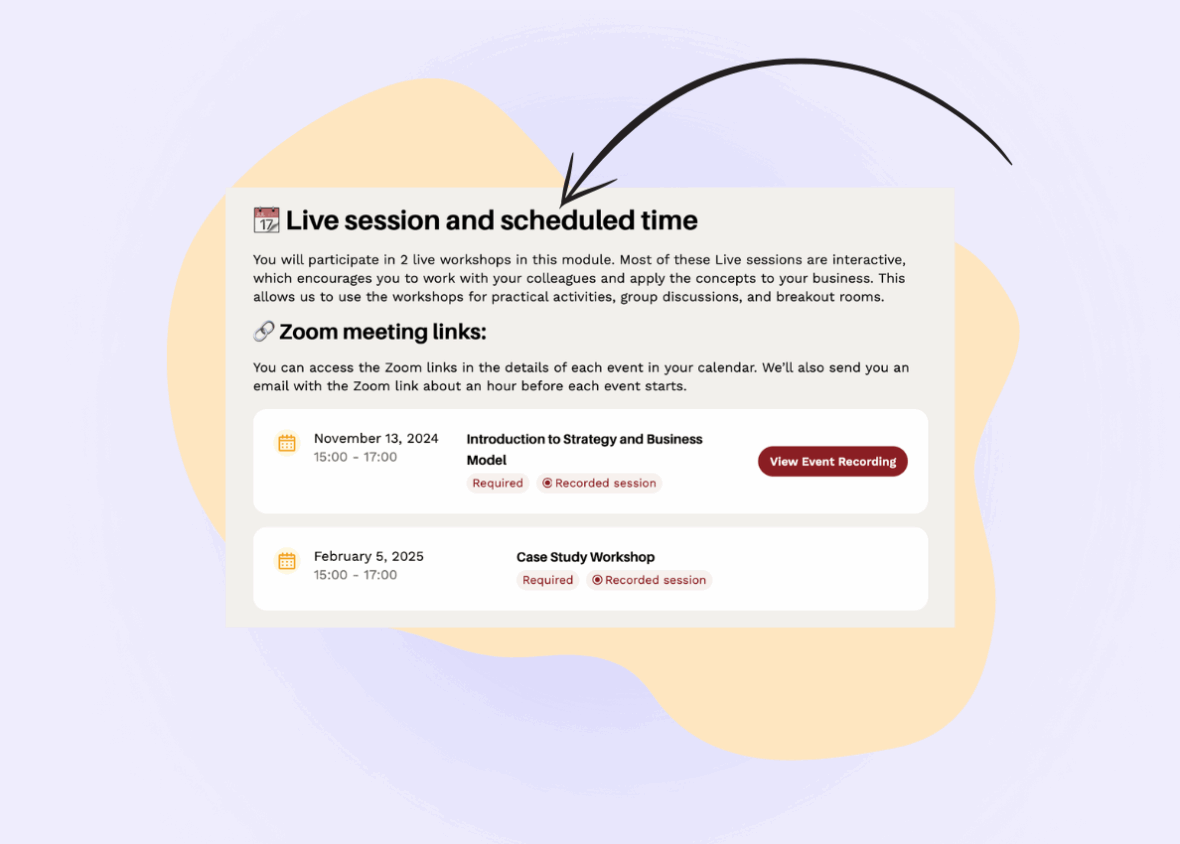
In any successful blended or guided learning program, clear communication between coaches and students is critical. For many LMS sites, it’s also one of the biggest headaches. We see the same complaints over and over: messages scattered across email and chat apps, notices buried in inboxes, dozens of Zoom links to keep track of, and updates that feel generic instead of timely and relevant. Coaches waste hours rewriting the same reminders, students miss deadlines because they can’t find important information, and everyone ends up frustrated.
When the Anzisha team, a leadership and entrepreneurship program for young African changemakers, asked us to help them design and build their LMS, building a system that could handle communication gracefully was one of their priorities. They needed more than what LearnDash offers to keep coaches and students connected. Anzisha’s coaches guide students through every step of a cohort-based program with live workshops, reminders, and personal encouragement. They didn’t want their coaches buried in repetitive admin work just to stay in touch.
We set out to make coach communication effortless in a WordPress LMS, so that coaches spend less time on admin and more time guiding students. From easy-to-use announcement tools to simple, template-based emails, Anzisha’s team can now send personalized, relevant updates to each group of students right from within their dashboards with no need for a fully featured on-platform messaging solution that wouldn’t meet Anzisha‘s tight timeline needs.
How We Solved It for Anzisha
We started by building a dedicated space right inside each cohort’s management dashboard enabling coaches to draft notices and emails in one place. This hub brings everything together: coaches write announcements, customize emails starting from a library of templates, and choose exactly who should receive them, all without leaving the WordPress LMS.The Notices feature displays a feed of relevant notifications in each student’s individual and cohort dashboards. A student will only see notices that match their cohort, and that fall within the time frame the notice is set to be active. The feed shows them from newest to oldest, with important notices highlighted in red instead of the standard gray. This ensures that only the right notifications appear, that the dashboard remains uncluttered, and that students stay focused without being overloaded with information they don’t need.

Anzisha needed a solution that would be scalable, easy to use, and easy to maintain. Instead of building a fully custom system from scratch (which would be expensive to build and maintain), we leaned on tried-and-true WordPress features like custom post types and fields. Advanced Custom Fields Pro (ACF) is a popular, well-supported plugin that makes it easy to add custom field interfaces in WordPress.
Using ACF, we created a Field Group attached to LearnDash’s Group Post Type, with a Repeater Field at its core so coaches could add as many notices as needed for each cohort. Inside that repeater, we defined sub‑fields for everything a notice needs: Start Date, End Date, Mark as Important, the notice Content, and optional Call to Action URL and Text. Below is a table of our configuration for Anzisha’s notices.
| Field Label* | ACF Field Name* | ACF Field Type |
| Start Date | date_start | Date Picker |
| End Date | date_end | Date Picker |
| Mark as Important | is_important | True / False |
| Content | content | WYSIWYG Editor |
| Call to Action URL | cta_url | URL |
| Call to Action Text | cta_text | Text |
*can be named to your own requirements, parent repeater is named cohort_notices
With that in place, the backend is fully configured. Each cohort’s admin page now includes an ACF‑powered form whose field names (e.g., date_start, date_end, is_important, content, cta_url, cta_text) double as the exact keys our frontend form will use to post notices into the system (more on that soon). Coaches can add or edit notices right in the group edit screen, and those same keys seamlessly power the frontend notice‑posting and listing UIs.
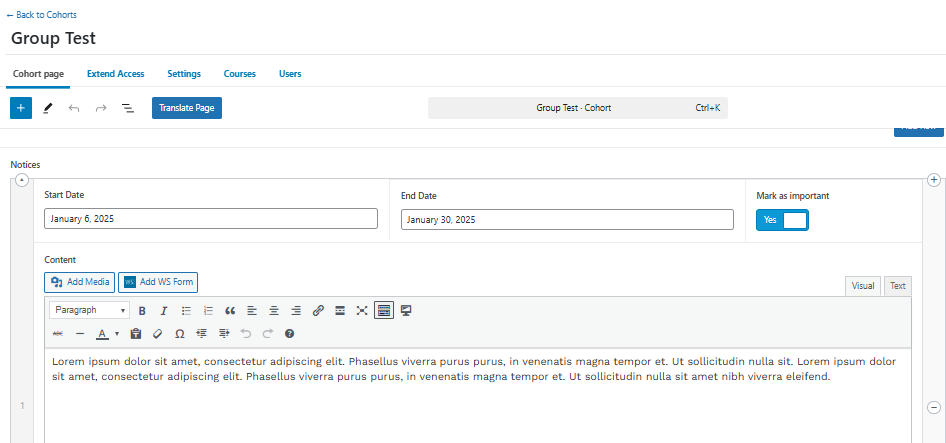
Since not every coach on the Anzisha team (or on most teams) is comfortable navigating a site’s backend, we built on our ACF configuration to create a frontend form for posting notices instead. Using WS Form and its Post Management Add-on, we mapped the WS Form fields directly to the ACF keys we set up earlier. The result is an embeddable form in coaches’ dashboards that lets them create and publish notices without ever touching the backend.
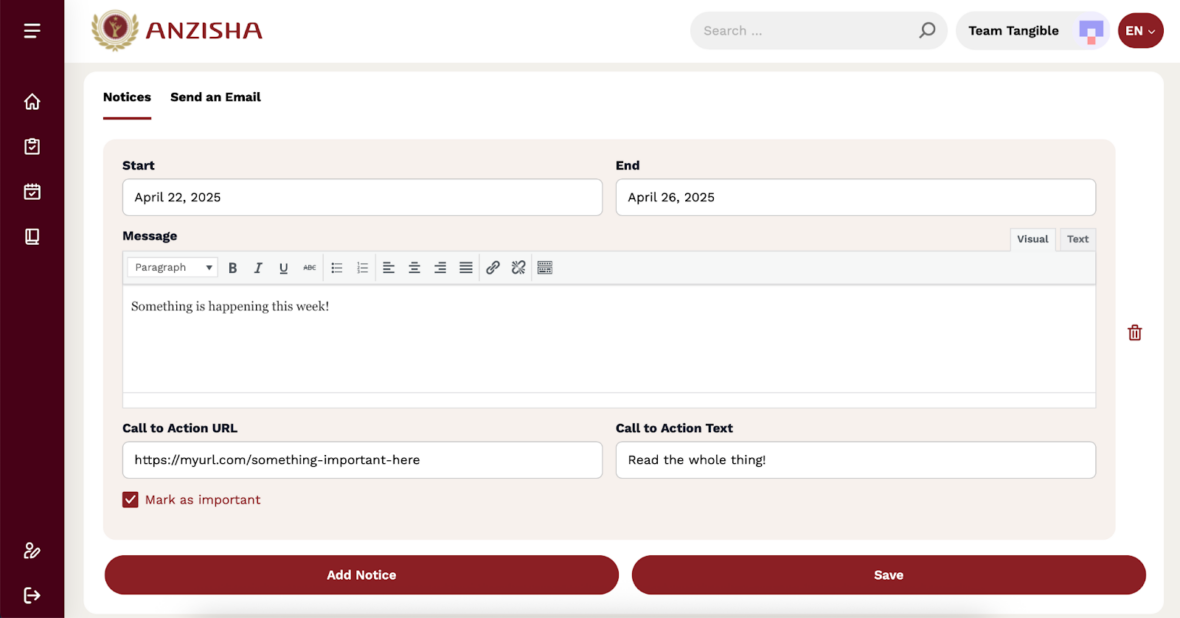
The following Loops & Logic template pulls notices from each user’s enrolled groups and filters them by date and importance:
<Set notice_count>0</Set>
<Set template=notice_data_query>
<Set notice_group_id><Field id /></Set>
<Set notice_group_title><Field title /></Set>
<Set notice_group_url><Field url /></Set>
<Loop acf_repeater=cohort_notices>
<Set notice_count><Math><Get notice_count /> + 1</Math></Set>
<Map name="notice_{Get notice_count}">
<Key content><Field content /></Key>
<If field=date_start><Key date><Field acf_date=date_start locale="{User locale}" date_format="F j, Y" /></Key></If>
<If field=date_start><Key date_start_ymd><Field acf_date=date_start date_format="Y-m-d" /></Key></If>
<If field=date_end><Key date_end_ymd><Field acf_date=date_end date_format="Y-m-d" /></Key></If>
<Key group_id><Get notice_group_id /></Key>
<Key group_title><Get notice_group_title /></Key>
<Key group_url><Get notice_group_url /></Key>
<Key cta_url><Field cta_url /></Key>
<Key cta_text><Field cta_text /></Key>
<If field=is_important value=true><Key important>true</Key></If>
</Map>
</Loop>
</Set>
<If check="{Get local=group_id}">
<Get template=notice_data_query />
<Else />
<Loop type=learndash_group enrolled=true>
<Get template=notice_data_query />
</Loop>
</If>
<If variable=notice_count not value=0>
<div class="anz-section anz-notices has-theme-rusty has-style-card-accent">
<div class="anz-section__header anz-notices__header">
<div class="anz-section__header__title">
<i class="anz-section__header__icon icon-bullhorn-outline"></i>
<h2 class="anz-section__header__title__text anz-notices__title"><Template name=i18n string=notices fallback=notices /></h2>
</div>
</div>
<ul class="anz-list anz-list--context-notices">
<Loop times="{Get notice_count /}">
<Set notice_map_name>notice_<Get loop=count /></Set>
<Set notice_date_end><Field date_end_ymd map="{Get notice_map_name /}" /></Set>
<If variable=notice_date_end after_inclusive=today>
<Set notice_date_start><Field date_start_ymd map="{Get notice_map_name /}" /></Set>
<Set notice_date_start_attr><Date format=Y-m-d><Field date_start_ymd map="{Get notice_map_name /}" /></Date></Set>
<If variable=notice_date_start before_inclusive=today>
<Set notice_is_important><Field important map="{Get notice_map_name /}" /></Set>
<Set notice_url><Field cta_url map="{Get notice_map_name /}" /></Set>
<Set notice_group_url><Field group_url map="{Get notice_map_name /}" /></Set>
<Set notice_group_id><Field group_id map="{Get notice_map_name /}" /></Set>
<li class="anz-list__item notice notice-group-{Get notice_group_id /}" data-date="{Get notice_date_start_attr /}" tag-attributes="{If variable=notice_is_important}data-important=true{/If}">
<div class="anz-list__item__wrapper{If variable=notice_is_important value=true} has-theme-rusty{Else /} has-theme-primary{/If} has-style-card-cta">
<div class="anz-list__item__details">
<Field content map="{Get notice_map_name /}" />
</div>
<div class="anz-list__item__actions">
<div class="anz-list__item__meta anz-list__item__meta--inline">
<If variable=notice_date_start><span><Field date map="{Get notice_map_name /}" /></span></If><If check="{Get local=context}" not value=student-cohort-dashboard><If variable=notice_date_start> • </If><a href="{Get notice_group_url /}"><Field group_title map="{Get notice_map_name /}" /></a></If>
</div>
<If variable=notice_url>
<div class="anz-list__item__actions__item--cta">
<a href="{Get notice_url}" class="button button--style-outline"><Field cta_text map="{Get notice_map_name /}" /></a>
</div>
</If>
</div>
</div>
</li>
</If></If>
</Loop>
</ul>
</div>
</If>
Then added the following JavaScript to theLoops & Logic template under the Script tab:
// Get the list element
const list = document.querySelector('.anz-list.anz-list--context-notices');

if(list){
  // Convert the HTMLCollection of list items to an array
  let items = Array.from(list.children);
  // Sort the items based on the data-date attribute and data-important attribute
  items.sort((a, b) => {
    const dateA = new Date(a.getAttribute('data-date'));
    const dateB = new Date(b.getAttribute('data-date'));

    // Compare dates
    if (dateA  dateB) return -1;

    // If dates are the same, compare data-important attribute
    const importantA = a.hasAttribute('data-important');
    const importantB = b.hasAttribute('data-important');

    if (importantA && !importantB) return -1;
    if (!importantA && importantB) return 1;

    return 0;
  });

  // Append the sorted items back to the list
  items.forEach(item => list.appendChild(item));
}
Wanting to keep the site as lean as possible, we re-used ACF, WS Form, and Loops & Logic to implement the Scripted Emails feature in the backend, while adding just a touch of custom JavaScript.
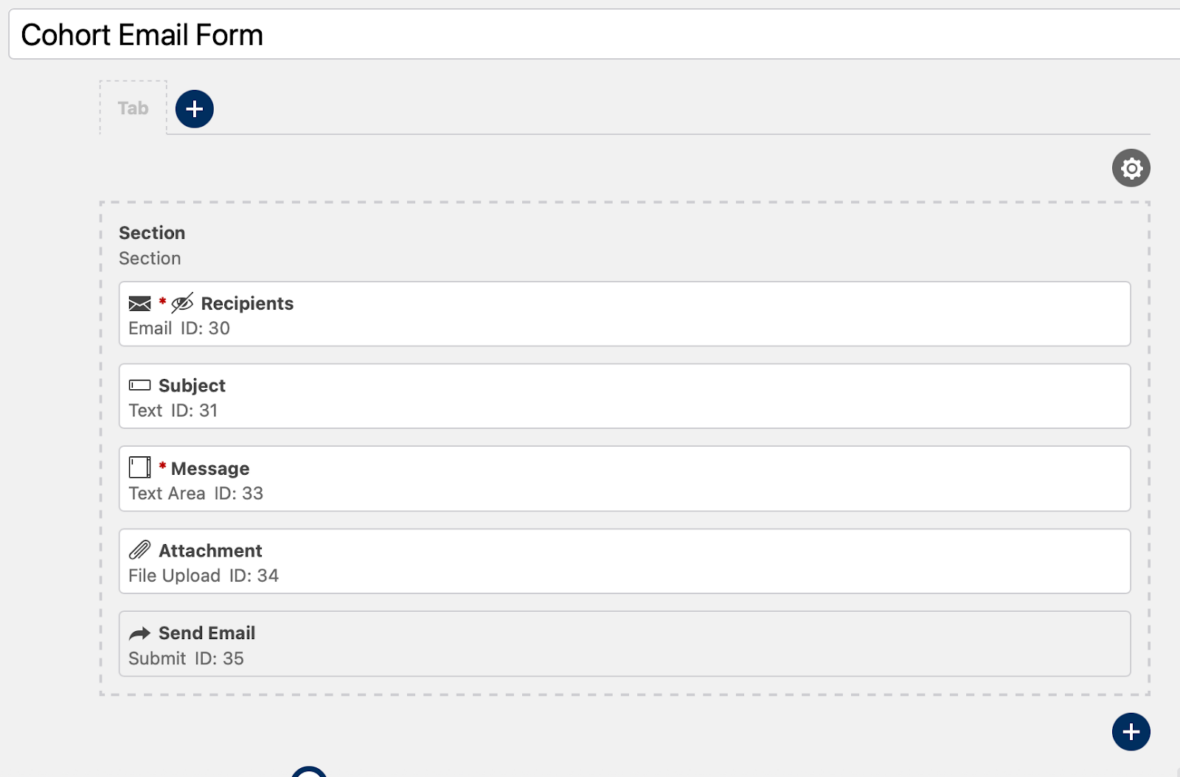
First, we set up the WS Form with a hidden email field for passing recipients into the form data:
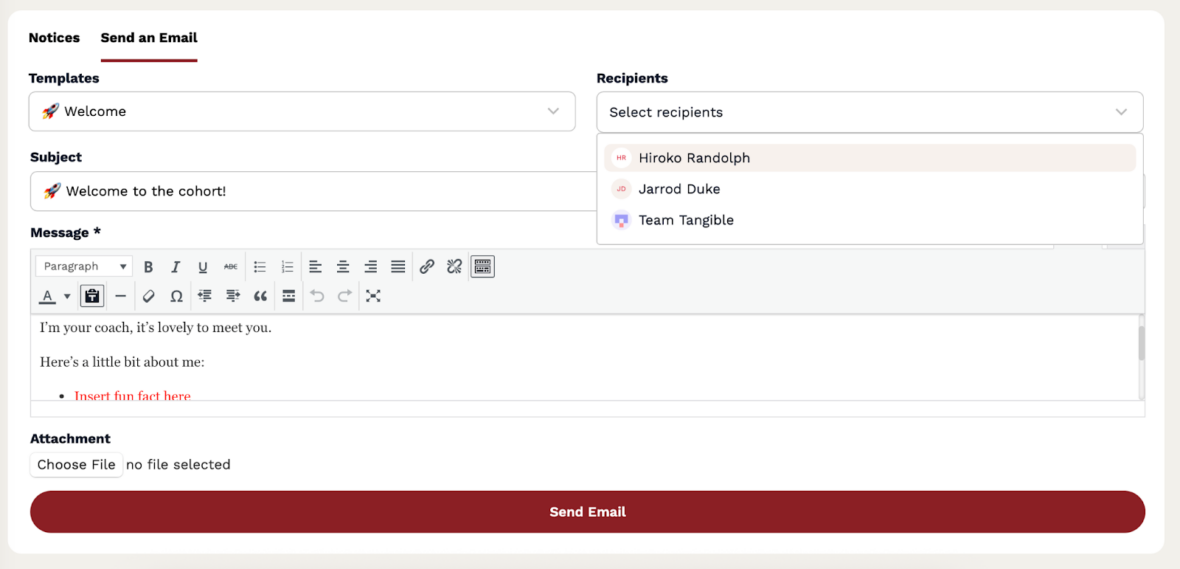
In the same dashboard as the Notices feature, coaches will find a tab for the Scripted Emails tool. Each program and group has its own set of scripted email templates, managed in the backend using ACF repeater fields. These templates provide default subjects and message bodies, which coaches can reuse when emailing their cohort, but can still be edited before the coach hits “Send”.
The email interface includes two smart controls:
- Templates dropdown – Built in L&L and populated by querying ACF repeater fields from the current group and its parent program. Selecting a template automatically fills the subject and body fields in the form. The body supports HTML, and we preserve formatting using innerHTML in TinyMCE.
- Recipients dropdown – Built in L&L and populated dynamically based on enrolled group members. Selecting students updates a hidden email field in the WS Form, handled by custom JavaScript. The label also reflects how many recipients are selected.
Because this data lives outside the form plugin itself, the JavaScript from earlier is necessary to push data from the Loops & Logic UI with the WS Form submission fields. This includes populating the recipient email list, updating the subject, and injecting the full HTML message into TinyMCE, all without needing to reload the page.
Why This Matters
By embedding coach communication into the LMS itself, Anzisha’s team regained hours previously spent chasing down Zoom links and juggling calendars. Learners now see only the updates that matter to them, reducing confusion and boosting attendance at live sessions. And because it mostly runs on familiar WordPress tools, (custom post types, ACF, WS Form, Loops & Logic, and simple shortcodes) scaling to new cohorts or adjusting templates requires no developer intervention. Everything works reliably, and nothing is locked behind custom code.
The result is that coaches can quickly send emails by selecting a message template, choose their recipients, or post notices with just a few clicks. It’s fast, structured, and intuitive. Together, these two capabilities give coaches a single place to manage both quick on-screen alerts and full-length email messages, all tied directly to each learner’s cohort and schedule.
Best of all, we didn’t have to install any plugin bloat to get these features up and running. No BuddyBoss, no complicated on-site peer-to-peer messaging, nothing crazy, just a simple, easy-to-use system put together with multi-purpose, performant tools.
Want Something Like This?
At Team Tangible, we build LMS experiences that go beyond the basics. If you’re running an educational program and your current platform isn’t cutting it, we can help. From smart cohort targeting to real-time dashboard updates, we make it easy and effective to communicate with your learners from right inside of your WordPress LMS.
Let’s talk about how your coaches and learners could benefit from clearer, more reliable communication.